Advertisement
How to install a TV digital antenna in Kenya: Step-by-step guide
25th May, 2026 09:01 PM
More households in Kenya are now switching away from expensive cable television (TV) subscriptions and moving toward free-to-air television.
A TV digital antenna makes this possible by allowing you to access local channels without monthly payments.
If you are wondering how to install a digital TV antenna in Kenya, the process is simpler than most people think.
Whether you live in Nairobi apartments, rural areas, or suburban estates, this guide will show you exactly how to set up your antenna for strong and stable TV signals.
Why use a digital TV antenna in Kenya
A digital TV antenna allows you to watch free-to-air channels without paying subscription fees.

Once installed correctly, it can provide access to news, entertainment, sports, and educational content, depending on your location and signal strength.
It is especially useful in Kenya, where digital broadcasting is widely available, and coverage continues to improve across major towns and rural areas.
What is needed
Before you begin the installation process, make sure you have the right equipment ready.
This helps avoid weak signals and setup errors.
You will need:
- A digital TV antenna (indoor or outdoor)
- A coaxial cable for connection
- A television with a built-in digital tuner
- A stable mounting position, such as a wall, window, or rooftop
For outdoor setups, you may also need a mounting pole or bracket to hold the antenna firmly in place.
Step 1: Choose the best location for a strong signal
The location of your antenna is the most important factor in getting clear channels.
For indoor antennas, place them near a window or high on a wall where they can receive fewer obstructions.
Avoid placing it behind thick walls, metal objects, or electronic devices that may interfere with the signal.
For outdoor antennas, install them on the roof or a high pole.
In Kenya, especially in Nairobi and other urban areas, height improves signal reception by reducing blockage from buildings.
Step 2: Connect the antenna to the TV
Take the coaxial cable from the antenna and connect it to the port labelled “ANT IN” or “RF IN” at the back of your TV.
If your antenna comes with a signal booster or amplifier, plug it into a power source according to the manufacturer’s instructions.
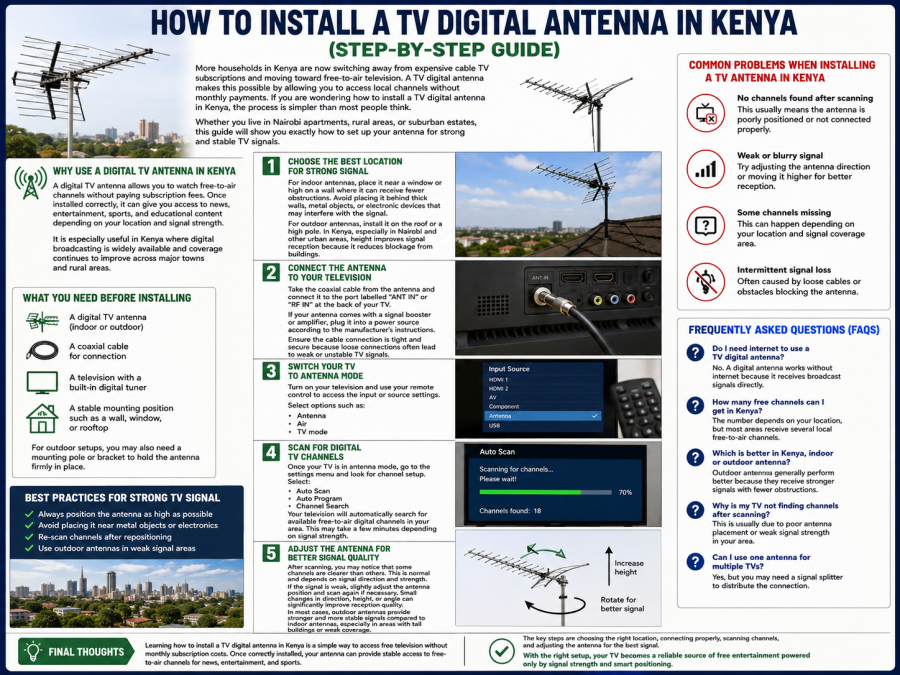
Ensure the cable connection is tight and secure because loose connections often lead to weak or unstable TV signals.
Step 3: Switch your TV to antenna mode
Turn on your television and use your remote control to access the input or source settings.
Select options such as:
- Antenna
- Air
- TV mode
This allows your television to receive broadcast signals instead of HDMI or cable inputs.
Step 4: Scan for digital TV channels
Once your TV is in antenna mode, go to the settings menu and look for channel setup.
Select:
- Auto Scan
- Auto Program
- Channel Search
Your television will automatically search for available free-to-air digital channels in your area.
This may take a few minutes, depending on signal strength.
After scanning is complete, your TV will save all available channels automatically.
Step 5: Adjust the Antenna
After scanning, you may notice that some channels are clearer than others. This is normal and depends on signal direction and strength.
If the signal is weak, slightly adjust the antenna position and scan again if necessary.
Small changes in direction, height, or angle can significantly improve reception quality.
In most cases, outdoor antennas provide stronger, more stable signals than indoor antennas, especially in areas with tall buildings or weak coverage.
Common problems when installing a TV Antenna in Kenya
Many users experience small issues during setup. Here are the most common ones:
No channels found after scanning
This usually means the antenna is poorly positioned or not connected properly.
Weak or blurry signal
Try adjusting the antenna direction or moving it higher for better reception.
Some channels missing
This can happen depending on your location and signal coverage area.
Intermittent signal loss
Often caused by loose cables or obstacles blocking the antenna.
Best practices for a strong TV signal
To improve your viewing experience:
- Always position the antenna as high as possible
- Avoid placing it near metal objects or electronics
- Re-scan channels after repositioning
- Use outdoor antennas in weak signal areas
Frequently Asked Questions (FAQs)
Do I need the internet to use a TV digital antenna?
No. A digital antenna works without the internet because it receives broadcast signals directly.
How many free channels can I get in Kenya?
The number depends on your location, but most areas receive several local free-to-air channels.
Which is better in Kenya, an indoor or an outdoor antenna?
Outdoor antennas generally perform better because they receive stronger signals with fewer obstructions.
Why is my TV not finding channels after scanning?
This is usually due to poor antenna placement or weak signal strength in your area.
Can I use one antenna for multiple TVs?
Yes, but you may need a signal splitter to distribute the connection.