Advertisement
How to set up a WhatsApp username
29th June, 2026 10:55 PM

WhatsApp is rolling out one of its biggest privacy updates in recent years by introducing usernames.
The new feature gives users another way to connect without sharing their phone numbers. While the rollout is happening gradually over the next few months, many people can already reserve a username so it will be ready when the feature becomes available on their account.
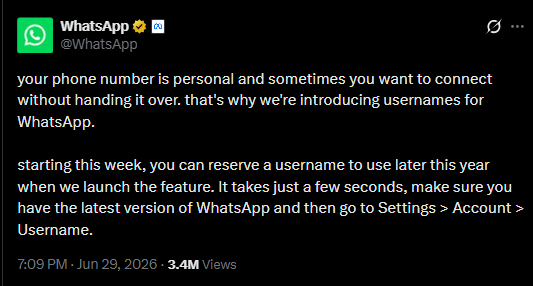
If you have been wondering how WhatsApp usernames work and how to set one up, here is everything you need to know.
What is a WhatsApp username?
A WhatsApp username is a unique name linked to your account. Every username begins with the @ symbol, such as @Paulette123, and is different from your regular profile name.
Unlike your display name, which several people can use, every username must be unique. Once your username becomes active, people can message or call you using it instead of your phone number. This adds an extra layer of privacy because your number stays hidden from people who do not already have it saved.
If usernames are not yet available on your account, you can reserve one in advance.
How to reserve your username
If the feature has reached your account, you can reserve a username by following the prompts inside WhatsApp.
- Tap More (three vertical dots) > Settings.
- Tap your profile.
- Tap Create username > Create username.
In areas where usernames are still rolling out, tap Reserve username > Create username. - Enter the username you want.
If the username is available, you will see a confirmation.
If it is not available, you can generate username suggestions based on your input. - Tap Save > Done.
Once you reserve it, no one else will be able to claim the same username while you are waiting for the feature to become active.
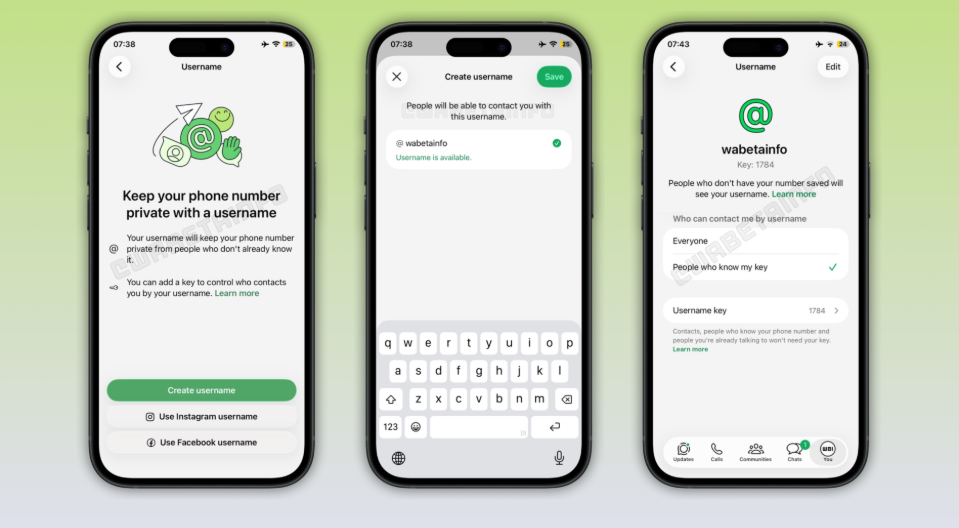
If the username you want has already been taken, you will need to choose another one. Some usernames are also reserved for businesses, public figures and government organisations, meaning regular users cannot claim them.
You can also change or delete your reserved username whenever you want. However, if you give it up, another eligible user may be able to claim it.
When will it become active?
Reserving a username does not mean you can use it immediately. WhatsApp says the feature is being released in stages, so availability depends on your account.
Once your username is ready, you will receive a notification in WhatsApp. At that point, you can start sharing your username with new contacts instead of your phone number.
Until then, no one can search for or contact you using your reserved username.
How to start a chat using a username
Once usernames are active, starting a conversation will be simple.
Open the Chats tab and begin a new chat. Tap the search bar and type the person’s complete username exactly as it appears. If the username exists, you can select it and start chatting.
Some users may choose to protect their username with an additional username key. If they have enabled this option, you will need to enter the correct key before the conversation can begin.
Inside the chat, you will see the person’s username alongside their display name. If their phone number is not already saved in your contacts, it will remain hidden.
Since the feature is being introduced gradually, not everyone will see it at the same time. Keeping WhatsApp updated gives you the best chance of receiving the latest features as soon as they are released.