Meta AI on WhatsApp: Why you should disable it and how to do it easily
By Paulette Mboga, September 3, 2025WhatsApp’s Meta AI assistant has sparked a variety of reactions among users.
While some enjoy having an AI ready to answer questions or assist with tasks, others are eager to regain full control over their chats. If you’re wondering whether you can truly turn off Meta AI and if it’s worth the effort, here’s a detailed look at the feature, ways to minimise its presence, and reasons some users prefer to keep it at bay.
What it does on WhatsApp
Meta AI is an integrated artificial intelligence assistant designed to make WhatsApp more efficient. It helps with tasks like replying to messages, answering questions, or offering quick suggestions, essentially acting as a digital helper within the app.
Despite its intended convenience, not everyone finds Meta AI useful. Concerns about privacy and the amount of personal data the AI accesses while assisting with chats have caused some users to rethink its inclusion. Others simply prefer a cleaner, distraction-free app without extra features they might never use.
The ability to disable Meta AI also varies by region. In Europe, users generally have more control and can remove the feature entirely, while in countries like Argentina, the AI cannot be uninstalled. Users there can only limit its visibility, leaving some wondering how much choice they really have.
Minimising Meta AI’s presence
Even if complete removal isn’t possible, there are practical ways to reduce how often Meta AI appears in your WhatsApp interface. One effective method is to hide its chat window and remove the blue Meta AI icon from your active conversation list.
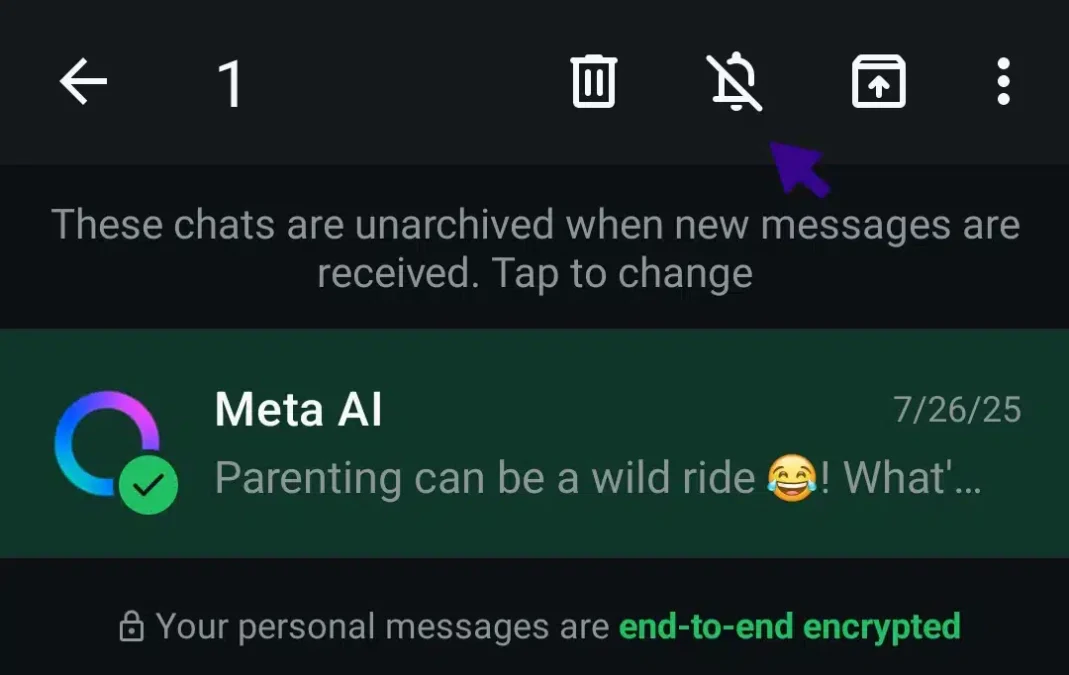
This doesn’t delete the AI from the app entirely, but it keeps your chat list less cluttered. If you want to interact with Meta AI again, simply search for “Meta AI” in your contacts or start a new conversation through the search bar.
People have different reasons for wanting to limit or disable Meta AI. Privacy concerns top the list, with some worried about how their data might be used despite Meta’s assurances. Others simply prefer a more streamlined experience without AI-generated suggestions or prompts interfering with their conversations. There are also instances where Meta AI provides inaccurate or confusing responses, which can make its assistance more frustrating than helpful.
Steps to limit Meta AI’s visibility
While these steps won’t remove Meta AI completely, they help create a cleaner chat experience where your conversations are focused on real contacts rather than automated prompts. Here are practical tips to minimise Meta AI in your WhatsApp chats:
Hide the chat: Archive it and enable “Keep Chats Archived” in Settings.
Mute notifications: Long-press or swipe the chat, select Mute, and choose Always.
Turn off smart suggestions: Go to Settings > Chats > App Settings > Suggestions & Smart Replies, then toggle off.
Disable predictive text: Turn off predictive text or auto-suggest in your keyboard settings.