How to verify your eLogbook’s authenticity in steps
By Dan Kauna, June 10, 2026Kenya officially retired the paper logbook on June 10, 2026. If you own a vehicle, your motor vehicle registration certificate now lives on your phone, not in a drawer.
The National Transport and Safety Authority (NTSA) calls it the eLogbook, and it is accessible through your eCitizen account or the official NTSA mobile app.
In its public notice issued on May 12, 2026, NTSA described the shift as “a major milestone in the Authority’s commitment to providing efficient, paperless, and citizen-centred services.”
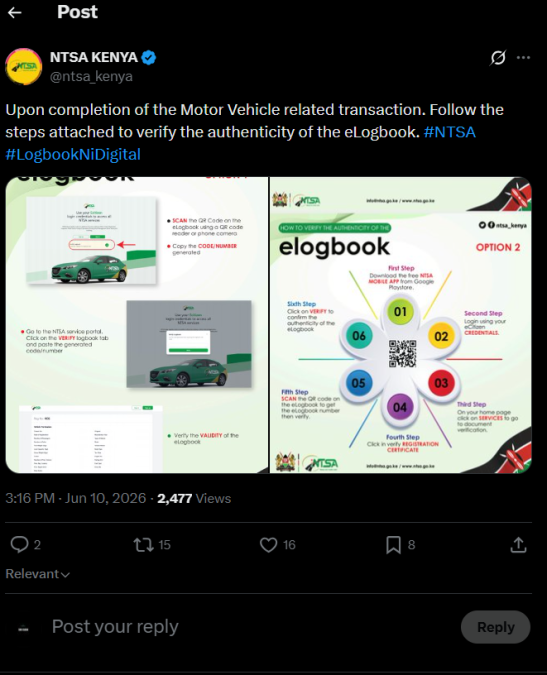
The eLogbook carries a QR code that any buyer, bank, insurer, or traffic officer can scan to confirm ownership and vehicle details against live government records, making forged documents significantly harder to pass off.
Option 1: Verify via the NTSA website
The quickest route requires no app download. Open a browser on your phone or computer and go to the NTSA service portal at ntsa.go.ke.
On the homepage, scan the QR code on your eLogbook using your phone camera or any QR reader.
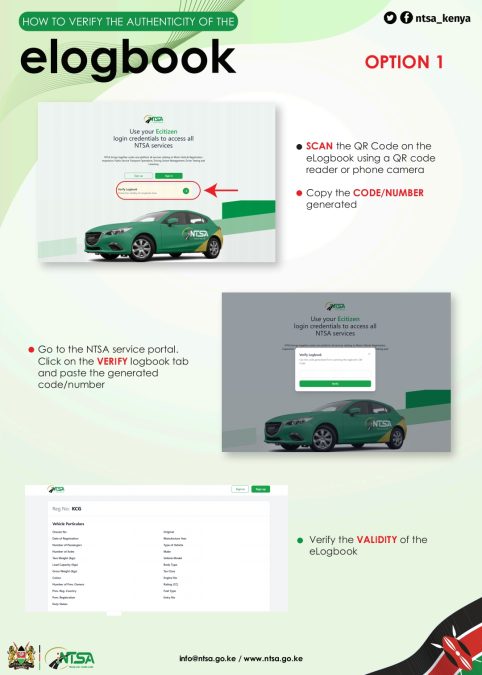
Copy the code or number the scan generates, then go back to the portal, click the ‘Verify Logbook’ tab, paste that code, and hit ‘Verify’.
The system will pull up your vehicle particulars: chassis number, engine number, registration date, body type, fuel type, owner details, and more.
If all those match what’s on the document, the eLogbook is genuine.
Option 2: Verify via the NTSA mobile app
Download the free NTSA mobile app from the Google Play Store.
Log in using your eCitizen credentials – the same username and password you use on ecitizen.go.ke.
On the home page, tap ‘Services’, then select ‘Document Verification’, and from there, click ‘Verify Registration Certificate’.
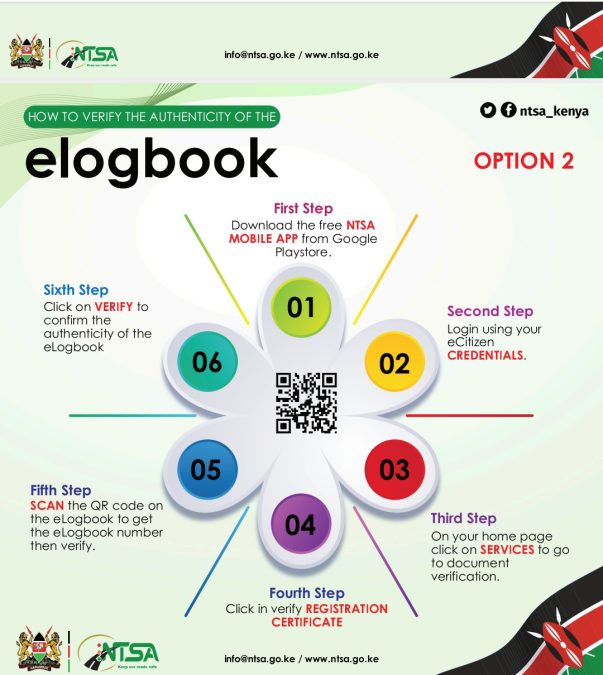
Scan the QR code on the eLogbook, then tap ‘Verify’ to confirm authenticity.
That second option is useful when a traffic officer, a bank, or an insurer wants to confirm ownership on the spot. NTSA has confirmed that the eLogbook integrates directly with its inspection and registration systems, so any details it displays are pulled from live government records.
One thing to sort out now if you haven’t already: make sure your eCitizen account is active and your vehicle records are current with NTSA. Without that, you cannot access or verify your eLogbook.
For support, contact NTSA via email at info@ntsa.go.ke, visit the nearest NTSA office, or check the NTSA Help Desk at any Huduma Kenya Centre.