Advertisement
Why Windows 11’s right-click menu is slow and what Microsoft is doing
18th August, 2026 08:56 AM
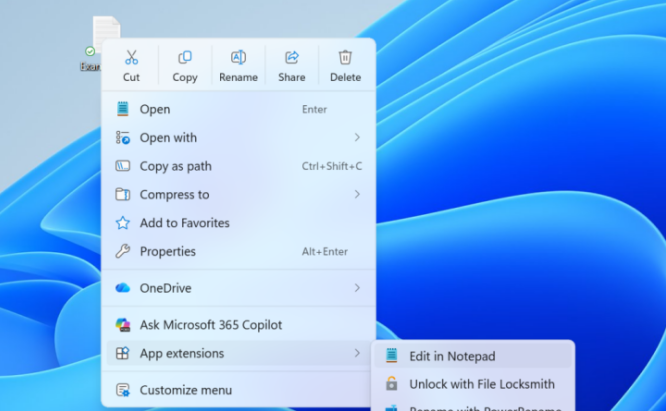
Windows 11 users who have complained about the operating system’s slow and cluttered right-click menu are finally getting some good news.
In a statement on Monday, August 17, 2026, Microsoft announced a redesigned context menu aimed at making one of Windows’ most frequently used features faster, simpler and more customizable.
The changes are currently rolling out to Windows Insiders as Microsoft continues its broader effort to improve the performance and reliability of Windows 11.
Microsoft acknowledged that the Windows 11 context menu has become cluttered and sluggish over time.
The company says part of the problem comes from applications adding their own options to the menu. Every time a user right-clicks a file or folder, Windows may have to process these additional extensions before displaying the full menu.
“We recognised the need to dramatically reduce the time between right-clicking and having a menu that’s fully ready to use,” Microsoft said.
The result can be a noticeable delay between right-clicking and being able to select an option.
Microsoft says its new design is intended to reduce this delay while making commonly used commands easier to find.
A faster right-click menu
One of the biggest changes is improved opening speed.
Microsoft says the redesigned menu benefits from engineering improvements behind the scenes, as well as a cleaner default layout.
The company is also reducing clutter by keeping frequently used actions easily accessible while moving additional options into Settings.
For people who use the right-click menu dozens of times a day, even small improvements could make everyday tasks feel smoother.
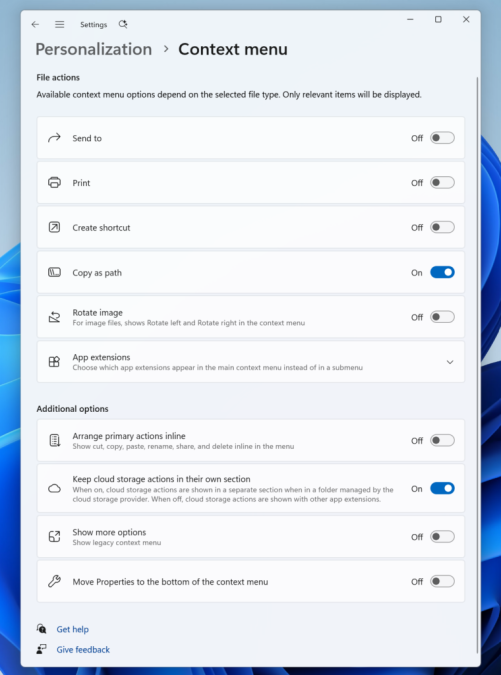
Microsoft is also giving Windows 11 users more control over what appears in the context menu.
A new “Customise menu” option will provide a shortcut to a dedicated Context Menu page in Windows Settings.
From there, users will be able to control several aspects of the menu.
Built-in Windows commands such as Send to and Create shortcut can be turned on or off. Microsoft is also bringing back options such as Print, which had not previously been available in the Windows 11 context menu in the same way.
Users will also be able to decide which application extensions appear in the main menu or a submenu.
Windows 10-style options return
For users who never got used to the Windows 11 context menu, Microsoft is adding another useful option.
“Today, we’re excited to announce an updated context menu that delivers a faster, simpler, and more customizable experience,” Microsoft said.
The new settings will allow users to display common commands such as Cut, Copy, Paste, Rename, Delete and Share directly in the menu instead of relying on a row of icons.

Users can also move Properties to the bottom of the menu.
The changes are designed to accommodate people who have developed years of muscle memory using the traditional Windows interface.
File explorer also getting improvements
The context menu is not the only part of File Explorer receiving attention.
Microsoft says it has been working on reducing freezes, delays and interruptions across File Explorer.
The company says File Explorer now launches faster and should feel more consistent and responsive during everyday tasks such as browsing, renaming files, navigating folders and selecting multiple files.
Other improvements include file renames no longer being interrupted by background synchronisation and case-only filename changes appearing immediately.
Microsoft has also expanded support for opening folders in new tabs using a middle-click and improved the Address Bar to handle a wider range of inputs.
When will everyone get the new menu?
The redesigned context menu is currently rolling out to Windows Insiders, meaning it is being tested before a wider release.
Microsoft says it will continue refining the experience based on feedback from Windows Insiders.
For now, Windows 11 users on the standard public release may not see the new options immediately.
The update nevertheless signals that Microsoft is taking long-running complaints about the right-click menu seriously.
For millions of Windows 11 users, the goal is simple: right-click, get the menu quickly, and get back to work.
Author
William Muthama
William Muthama is a digital journalist with a focus on entertainment, human interest, and current affairs. Share stories: [email protected]/ [email protected]
View all posts by William Muthama