How to verify the authenticity of your eLogbook
By Paulette Mboga, June 17, 2026The National Transport and Safety Authority (NTSA) has outlined steps that users should follow to verify the authenticity of an eLogbook after completing a motor vehicle transaction.
The process is part of efforts to improve service delivery and ensure proper document verification for vehicle owners. The authority noted that the steps are simple and meant to help users confirm the validity of their registration documents.
“Upon completion of the motor vehicle-related transaction. Follow the steps attached to verify the authenticity of the eLogbook,” NTSA stated on Wednesday, June 17, 2026.
First step: Download the NTSA mobile app
The first step requires users to download the NTSA Mobile App from the Google Play Store. The authority said this is the main platform used to access digital services, including document verification.
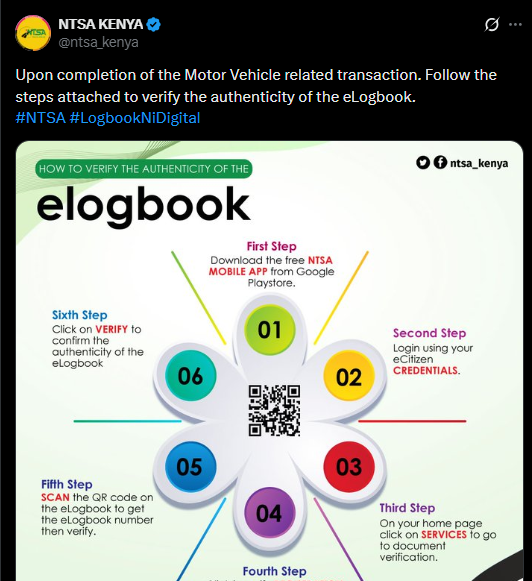
“Download the free NTSA MOBILE APP from Google Play Store,” NTSA explained.
Second step: Users are required to log in using their eCitizen credentials.
This step is important because it links the user’s identity to their official records on the system.
Third step: Access services and verification
After logging in, users are instructed to go to the services section on the home page. This section provides access to different digital services offered by NTSA, including document checks.
“On your home page, click on SERVICES to go to document verification,” NTSA explained.
Step four: Click on verify registration certificate
Next, users are required to select the option for verifying the registration certificate. This step directs them to the specific document verification section within the system.
The process continues with scanning the QR code found on the eLogbook. This helps retrieve the eLogbook number needed for verification.
“SCAN the QR code on the eLogbook to get the eLogbook number, then verify,” NTSA said.
Finally, users are required to click the verify option to confirm the authenticity of the eLogbook. The authority said this step completes the process and ensures the document is valid.
“Click on VERIFY to confirm the authenticity of the eLogbook,” NTSA stated.
System update and service resumption
This comes after NTSA resumed normal operations following a successful eLogbook transition carried out last week. The authority confirmed that services were fully restored after a temporary system shutdown.
The National Transport and Safety Authority said the downtime was part of a planned update to support system improvements and strengthen the digital platform. The update was necessary to ensure a smooth transition to the new e-logbook system.
NTSA explained that the upgrade was aimed at improving efficiency and enhancing user experience across its services. The authority assured users that the system is now stable and fully operational for continued use.