Advertisement
How OTP verification works
24th March, 2026 11:33 PM
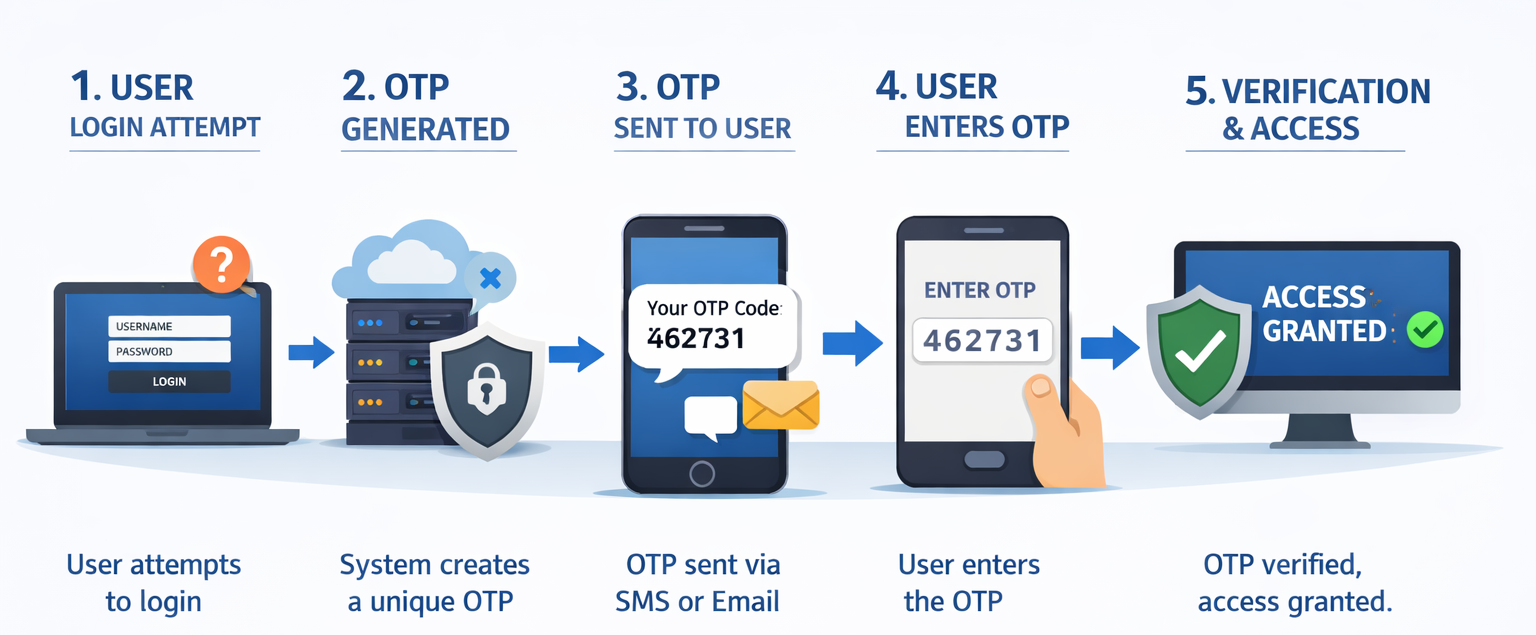
If you have ever tried logging into Facebook, Gmail, or even your bank app and suddenly received a code on your phone or email, then you have already used One-Time Password (OTP) verification.
It may feel like a small extra step, but behind it is a powerful security process designed to protect your account from unauthorized access.
Many people use OTP daily without fully understanding what is happening in the background. The process is actually simple once you break it down step by step.
Step 1: Entering your username and password
It all starts when you try to log into your account. You open an app or website, enter your username or email, then type your password and hit login.
At this point, the system checks if your details are correct. If the username and password match what is stored in the system, it does not immediately grant access. Instead, it triggers the next layer of security.
This is where OTP comes in.
Step 2: OTP generated
Once your login details are verified, the system creates a One Time Password, commonly known as OTP.
This is usually a short numeric code, often 4 to 6 digits.
The system then sends this code to you through a registered channel. It could be:
- An SMS to your phone number
- An email to your inbox
- Or even an authenticator app
For example, you might receive a message like, “Your verification code is 482193.”
This code is unique and only works for a short period, usually a few minutes.
Step 3: Entering the OTP
After receiving the code, you go back to the app or website and enter it in the space provided.
This step confirms something important. It proves that the person trying to log in is not just someone who knows the password, but also someone who has access to the registered phone or email.
In simple terms, it adds a second lock to your account.
Step 4: System validation
Once you enter the OTP, the system quickly checks if the code is correct and still valid.
If the code matches and has not expired, the system approves your login. Within seconds, you gain access to your account.
If the code is wrong or has expired, the system rejects it. You will see an error message like:
- “Invalid code”
- “OTP expired, request a new one”
At this point, you may need to request another code and try again.
Why OTP verification matters
OTP verification is a key part of two factor authentication, often called 2FA.
Even if someone manages to steal your password, they still cannot access your account without the OTP sent to your device.
This is why many platforms strongly encourage or even require OTP for sensitive actions like logging in, making payments, or changing account settings.
Real life example
Imagine someone tries to log into your Facebook account from another location.
They may have your password, but once they attempt to log in, an OTP is sent to your phone. Since they do not have your phone, they cannot proceed.
That extra step is what keeps your account safe.
OTP verification may feel like a small delay when logging in, but it plays a big role in protecting your digital life. It is a simple system, but very effective.
The next time you receive that code, just know it is not there to inconvenience you. It is there to make sure you, and only you, can access your account.