Advertisement
KRA issues guide on resolving corrupted Excel files during tax filing
30th June, 2026 09:54 AM

The Kenya Revenue Authority (KRA) has issued detailed guidance on how taxpayers can resolve errors linked to corrupted Excel files and macro reset issues during tax filing.
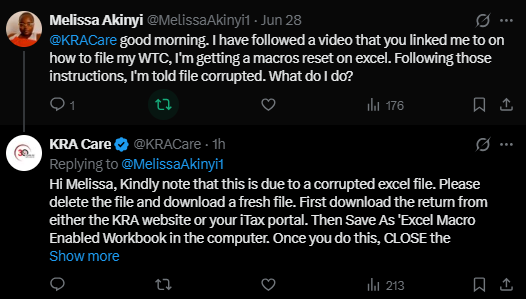
In response to complaints raised on X on Tuesday, June 30, 2026, KRA Care said the issue is often caused by a damaged or improperly saved file and advised taxpayers to restart the process using a clean download from official channels.
The issue has mainly affected taxpayers using Excel-based return forms, particularly those encountering file corruption messages or macro errors while processing Withholding Tax Certificate (WTC) filings and other returns.
Fresh download
KRA advises taxpayers experiencing the error to delete the affected file and download a fresh copy from either the KRA website or the iTax portal.
The authority says starting with a clean file helps eliminate hidden corruption that may interfere with macro functions embedded in the return template.
“Kindly note that this is due to a corrupted Excel file. Please delete the file and download a fresh file,” KRA Care stated.
Save correctly
Taxpayers are then instructed to download the return form from official channels and proceed to save it using the “Save As” function as an Excel Macro-Enabled Workbook.
KRA emphasises that this step is critical because the return file relies on macros to function properly during data entry, validation and submission.
Once the file is saved in the correct format, users are required to close the return completely before proceeding to the next step.
Reopen through excel
Taxpayers are then advised to go to their computer, locate the saved file, and open it directly using Microsoft Excel.
KRA warns against opening the file through other applications or previews, noting that this may trigger macro errors or prevent the return from loading correctly.
“Then save as ‘Excel Macro Enabled Workbook’ in the computer. Once you do this, CLOSE the return. Then go to your computer and browse for the return and open the file with ‘Excel’,” the agency added.
The authority says proper reopening ensures that all embedded functions in the return template are fully activated and ready for use.
The clarification comes as Kenyans race to complete their filings ahead of the deadline set for midnight on Tuesday, June 30, 2026, with the authority maintaining that no extension has been announced.
Author
William Muthama
William Muthama is a digital journalist with a focus on entertainment, human interest, and current affairs. Share stories: [email protected]/ [email protected]
View all posts by William Muthama