How to claim your KRA tax refund online
By Valerian Khakayi, July 3, 2026Eligible taxpayers can claim tax refunds from the Kenya Revenue Authority (KRA) through the iTax portal.
A tax refund is issued when a taxpayer has paid more tax than they were required to. Instead of visiting a KRA office, eligible taxpayers can submit their refund applications online through the iTax system.
Once the application is submitted, KRA will review the claim and, if approved, process the refund.
Here is how to claim your KRA tax refund online.
- Log in to your iTax account
Visit the iTax portal and log in using your KRA PIN and password.
This will give you access to the services available on your taxpayer account, including the refund application section.
- Select the refunds menu
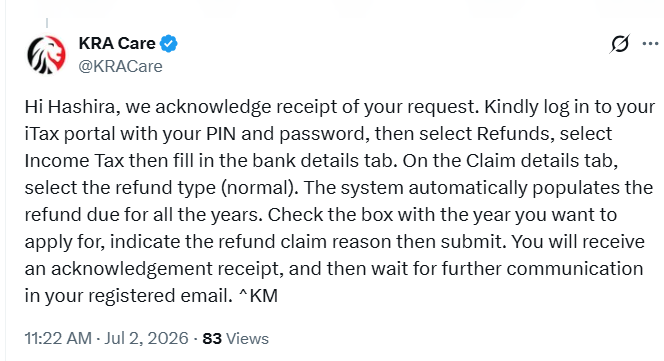
After logging in, click on the refunds menu and then select Income Tax.
This will open the tax refund application page, where you can begin the process.
- Enter your bank details
Under the Bank Details tab, fill in your bank account information carefully.
Ensure the details are accurate, as KRA will use this account to send your refund if your application is approved.
- Complete the claim details
Go to the Claim Details tab and select the refund type as Normal.
The iTax system will automatically display any refund amounts due for all eligible tax years.
- Select the tax year and indicate the refund claim reason
After selecting Normal as the refund type, the iTax system will automatically populate the refund due for all the available tax years.
Review the list and tick the checkbox next to the tax year for which you want to apply for a refund.
Once you have selected the relevant year, indicate the refund claim reason before proceeding.
- Submit your application
After completing the required details, submit your refund application through the iTax portal.
Once your application has been submitted successfully, the system will generate an acknowledgement receipt confirming that KRA has received your request.
- Wait for further communication
After receiving the acknowledgement receipt, wait for further communication from KRA through the email address registered on your iTax account regarding the status of your refund application.