Advertisement
How to set up a free verified Facebook badge
25th July, 2026 07:40 PM
Facebook users can now get a verified badge for free through Meta’s new identity confirmation feature, which allows people to prove they are real individuals behind their profiles.
The Facebook Verified badge is designed to help users identify authentic accounts and reduce fake profiles, scams and AI-generated identities on the platform.
Unlike Meta Verified, which requires a paid subscription, the new Facebook Verified feature is free for eligible users.
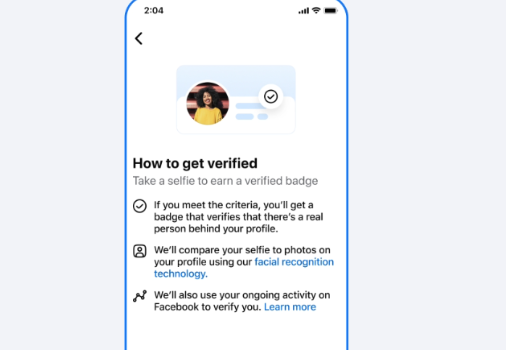
The process involves a selfie-based verification system where Facebook confirms a person’s identity by comparing a short video selfie with existing profile photos.
Because the feature is new and being rolled out gradually, the exact steps and menu options may differ depending on a user’s location, account type and Facebook app version.
Check eligibility
Before applying for the badge, users must meet Facebook’s requirements.
The account owner must be at least 18 years old, have an account in good standing and follow Facebook’s Community Standards, especially rules against fraud, scams and misleading behaviour.
The feature is currently available for eligible personal profiles and does not apply to Facebook Pages or Professional Mode accounts.
Users should also ensure their profile contains clear and recent photos that accurately show their face, as Facebook uses the images to compare against the selfie video submitted during verification.
Update Facebook app
To begin, users should ensure they are using the latest version of the official Facebook mobile app on either iOS or Android.
After updating the app, users should check whether the Facebook Verified option is available on their account.
The option may appear through a notification or prompt. Users can also check by opening their profile, selecting the menu icon, going to Settings & privacy, then Settings, and accessing Accounts Centre or Meta account settings.
Users should look for options labelled Facebook Verified, Get Verified or similar.
If the option does not appear, it means the feature has not yet reached that account or market, and users will need to check again later.
Complete selfie check
Once the Facebook Verified option appears, users can select it and follow the instructions provided.
The platform will ask users to record a short video selfie. The process may require users to move their head or follow prompts so Facebook’s system can capture different angles of their face.
After submitting the video selfie, Facebook’s system automatically reviews the information and compares the recording with existing profile photos.
The verification process is free and usually takes only a few minutes.
Badge appears
If approved, the verified badge is added to the user’s profile. Meta says users only need to complete the process once, with the badge remaining linked to their account.

The badge will appear on the user’s profile and across areas such as Facebook Marketplace, Dating and Groups. Meta also plans to expand its visibility to Feed posts in the future.
Author
William Muthama
William Muthama is a digital journalist with a focus on entertainment, human interest, and current affairs. Share stories: [email protected]/ [email protected]
View all posts by William Muthama